Manager Desktop Organizer · Table official 4 min
Run the live floor and certify a result Use the live console to monitor matches, assign tables, record the correct outcome, and certify results before progression.
Available Intermediate 6 steps en-CA Captions + transcript
▶ Watch≡ ReadBoth formats use the same source-verified steps.
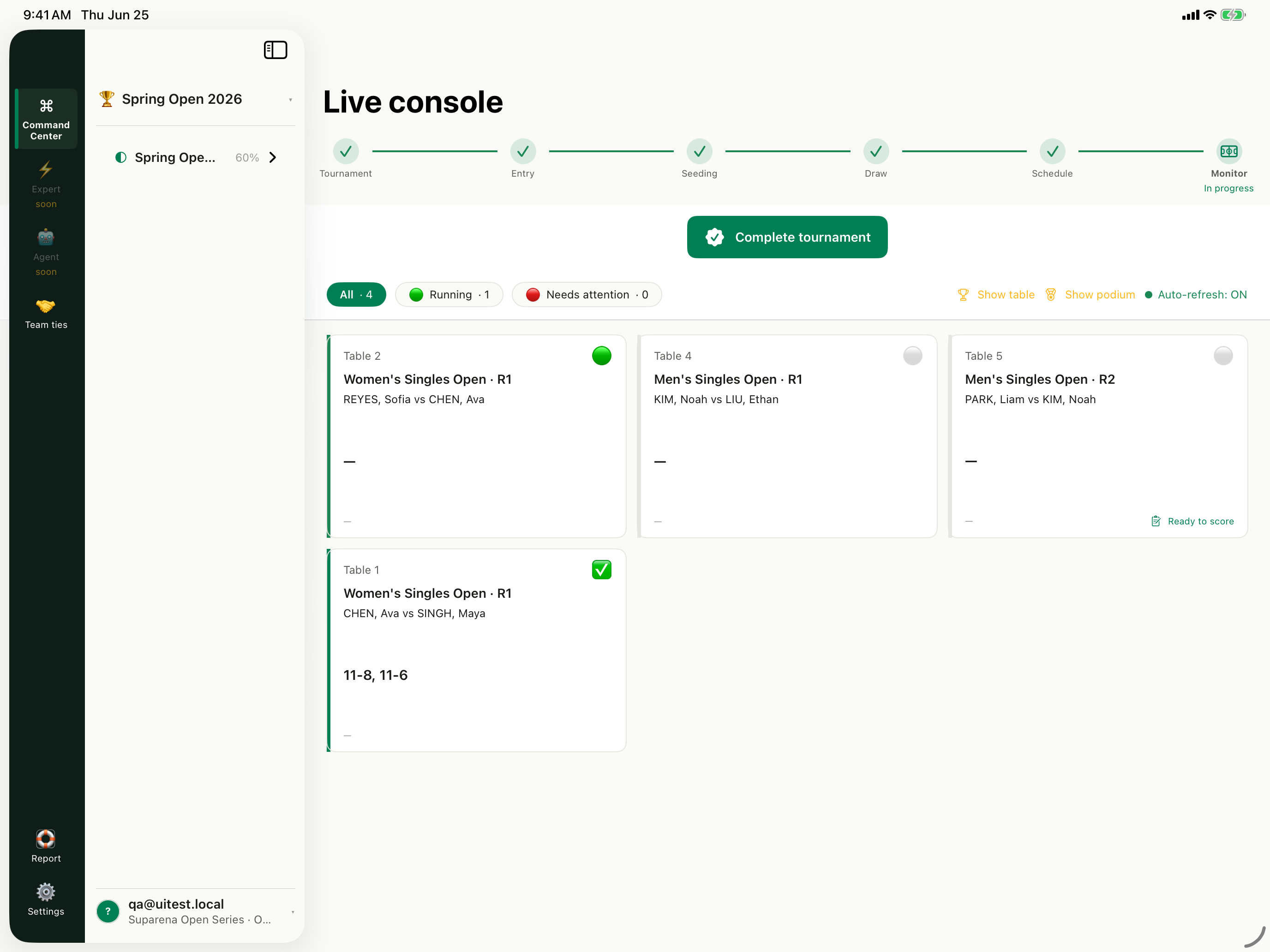
Live console and lifecycle Current first-party product capture · synthetic fixture data CC Open Live console and confirm the active tournament. Check the lifecycle ribbon and verify that auto-refresh is on before directing the floor.
01 Confirm the active competition Open Live console and confirm the tournament The live dashboard shows the tournament lifecycle, match filters, table cards, and auto-refresh state.
01 Open Live console and confirm the tournament 0:00 02 Filter Running or Needs attention 0:34 03 Assign a real table before calling the match 1:06 04 Call and start the match from its card 1:44 05 Submit the winner and game scores 2:20 06 Certify before progression or export 3:08 ← Previous Play guide Next →
← → navigate Space play/pause M narration F fullscreen
Step-by-step tutorial 1 Confirm the active competition Open Live console and confirm the tournament The live dashboard shows the tournament lifecycle, match filters, table cards, and auto-refresh state.
Live console and lifecycle Current first-party product capture · synthetic fixture data 2 Choose the right queue Filter Running or Needs attention Use the filters instead of scanning every card. Needs attention is the exception queue for the desk.
Running and Needs attention Current first-party product capture · synthetic fixture data 3 Check the table number Assign a real table before calling the match Manager warns about unassigned matches and exposes Assign tables. Do not call players to a table that is not physically ready.
Assigned table cards Current first-party product capture · synthetic fixture data 4 Use the match action menu Call and start the match from its card The match action menu supports Call match and the appropriate live transition. Confirm the event and entries before actioning it.
Running · Table 2 Current first-party product capture · synthetic fixture data 5 Record the honest outcome Submit the winner and game scores Use Submit result for a played match. Use Walkover, Retired/DQ, or Forfeit when those outcomes apply instead of inventing numeric scores.
Completed result · 11–8, 11–6 Current first-party product capture · synthetic fixture data 6 Make the result authoritative Certify before progression or export Certification locks the result and feeds standings. Resolve disputed scores before later rounds or federation export depend on the outcome.
Open the event-day runbook → iM Women's Singles Open · R1
Women's Singles Open · R1
Certify result LIVE DATA CHEN, Ava Winner 2
SINGH, Maya Runner-up 0
Games 11–8 · 11–6 REVIEWED
! Certification locks the result and feeds standings.
Disputed score… Certify result
Source-verified interface illustration · labels reflect the current implementation Use it anywhere Share, embed, or export Deep links preserve the current step. Embedded tutorials follow this site's access policy.
Share / copy link Copy embed Print / PDF Download Markdown Download captions
Transcript and step index 6 chapters · searchable on this page 0:00 Open Live console and confirm the tournament Open Live console and confirm the active tournament. Check the lifecycle ribbon and verify that auto-refresh is on before directing the floor. 0:34 Filter Running or Needs attention Use Running for active play and Needs attention for exceptions. This keeps the desk focused on matches that need intervention. 1:06 Assign a real table before calling the match Assign a real, available table before you call the players. Match cards should agree with the schedule and the physical floor. 1:44 Call and start the match from its card Open the match card actions, confirm both players and the event, then call and start the match when the floor is ready. 2:20 Submit the winner and game scores Submit the actual winner and each game score. For a non-played or interrupted outcome, use the dedicated exception action rather than a fictional score. 3:08 Certify before progression or export Review and certify the result. Certification is the control point before standings, stage advancement, and federation export rely on it. Knowledge check
What should an operator use for a walkover instead of entering a fictional score? A Submit resultB Mark walkoverC ArchiveD Open registration
Documentation feedback Was this tutorial helpful? You can submit feedback anonymously without names, contact details, IP addresses, or device identifiers.
Yes, it helped Not yet
Product evidence Verified 6 steps against source Verified against repository commit d95a40d1. Interface illustrations use current product labels; screenshot frames use synthetic XCUITest fixture data.
apps/manager-mac/Sources/iMatchManager/LiveConsole/LiveDashboardView.swiftapps/manager-mac/Sources/iMatchManager/LiveConsole/LiveMatchCard.swiftapps/manager-mac/Sources/iMatchManager/LiveConsole/SubmitResultSheet.swiftapps/manager-mac/Sources/iMatchManager/LiveConsole/CertifyResultSheet.swiftapps/manager-mac/fastlane/screenshots/en-US/iPad Pro 13-inch (M5)-05LiveConsole.pngReview feature status and boundaries →